
Provider and Protocol Reference
Overview
This page lists the available connection types for each protocol category and provides guidance on when to use each one.
Use this reference when configuring the Provider & Protocol section of an application.
The main settings are:
- Provider - for example Local, AWS, etc.
- Protocol Category - for example, HTTPS, Server, etc.
- Protocol Type - for example, RDP, SSH
After selecting a Protocol type, additional fields may appear depending on the protocol. These can include port settings, protocol-specific parameters, or security options.
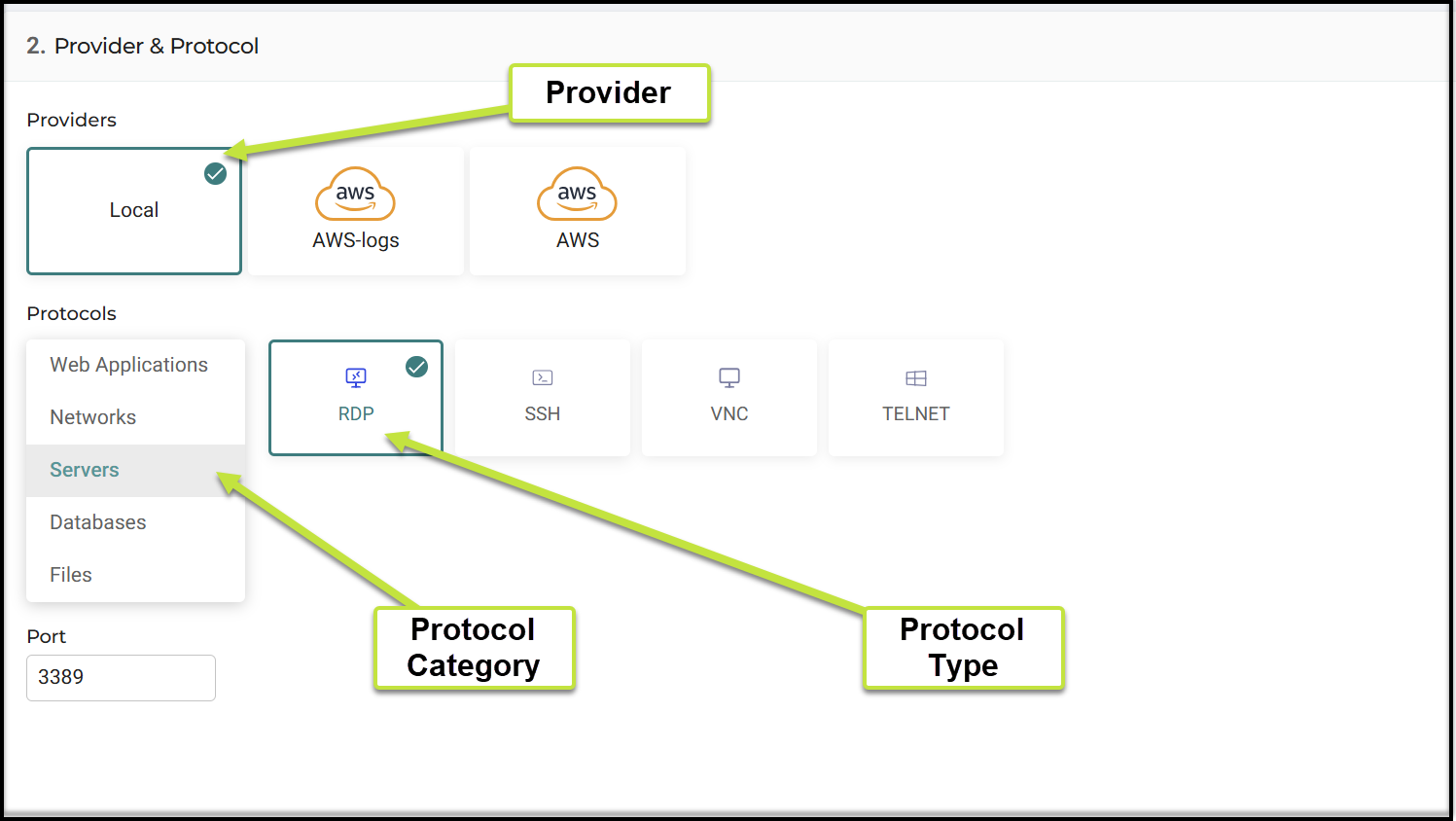
Connection Types by Protocol Category
| Protocol Category | Protocol Type | When to Use |
|---|---|---|
| Web Applications | HTTP | Use for web applications that do not require encryption |
| HTTPS | Use for secure web applications (default port 443) | |
| SaaS | Use for external SaaS applications managed outside your environment | |
| Link | Use for simple redirects to external URLs without a backend connection | |
| Networks | TCP | Use for access to a specific TCP port or service |
| Network | Use for access to multiple ports or broader network ranges | |
| Desktop App | Use for applications that require a local client | |
| SSH Tunnel | Use for secure tunneling of traffic over SSH | |
| HTTP Tunnel | Use for tunneling HTTP traffic through Cyolo | |
| Servers | RDP* | Use for remote desktop access to Windows servers (default port 3389) |
| SSH | Use for command-line access to Linux or Unix systems (default port 22) | |
| VNC* | Use for remote desktop access using VNC | |
| TELNET | Use for legacy terminal access (not secure) | |
| Databases | PostgreSQL | Use for access to PostgreSQL databases |
| MySQL* | Use for access to MySQL databases | |
| Files | SMB | Use for access to file shares using SMB |
| Protocol Category | Protocol Type | When to Use |
|---|---|---|
| Web Applications | HTTP | Web applications that do not require encryption |
| Web Applications | HTTPS | Secure web applications (default port 443) |
| Web Applications | SaaS | External SaaS applications managed outside your environment |
| Web Applications | Link | Simple redirect to an external URL without backend connection |
| Networks | TCP | Access to a specific TCP port or service |
| Networks | Network | Access to multiple ports or broader network ranges |
| Networks | Desktop App | Access to applications that require a local client |
| Networks | SSH Tunnel | Secure tunneling of traffic over SSH |
| Networks | HTTP Tunnel | Tunneling HTTP traffic through Cyolo |
| Servers | RDP* | Remote desktop access to Windows servers (default port 3389) |
| Servers | SSH | Command-line access to Linux or Unix systems (default port 22) |
| Servers | VNC* | Remote desktop access using VNC |
| Servers | TELNET | Legacy terminal access (not secure) |
| Databases | PostgreSQL | Access to PostgreSQL databases |
| Databases | MySQL* | Access to MySQL databases |
| Files | SMB | Access to file shares using SMB |
*Indicates that for this connection type, there are additional notes below: see Notes per Connection Type.
Protocol Category Descriptions
Web Applications
Use this category to publish web-based applications, including internal services, secure applications, SaaS platforms, and external links.
Networks
Use this category for network-level connectivity, including direct port access, broader network access, and tunneling scenarios.
Servers
Use this category to provide access to servers using remote desktop or terminal-based protocols.
Databases
Use this category to configure access to database services.
Files
Use this category to provide access to file shares.
Note on Ports
Default ports are automatically suggested for common protocols, such as:
- HTTPS: 443
- RDP: 3389
- SSH: 22
Notes per Connection Type
RDP
Ensure the server has the Remote Desktop Services (RDS) role added and RemoteApp programs published.
VNC
Ensure the server has the Remote Desktop Services (RDS) role added and RemoteApp programs published.
MySQL
MySQL Client/Server Support
Cyolo supports the following MySQL client/server apps:
- Client: v8.1+, v9.0.1/9.1
- Server: v5.X, v8
Note
Client v9.x cannot work with server v5 (this is not related to Cyolo).
Updated 4 months ago