
Passwordless Authentication - Certificate-Based Authentication
Overview
Seamless login with certificate-based authentication (CBA) improves Cyolo Connect user experience by enabling automatic authentication without repeatedly requesting credentials. Instead of requiring users to re-authenticate through an IdP when their tokens expire, CBA uses device-installed certificates to maintain continuous access.
This feature is particularly valuable for network applications and forward proxy traffic, where seamless connectivity enhances productivity while maintaining security.
Notes
- Certificate-based authentication is currently supported for network applications and forward proxy traffic. Support for other application types may be added in future releases.
- Passwordless Authentication is enabled within a Policy Condition that is associated with an application. You can associate Passwordless Authentication with all relevant applications, or only with some applications and still require log in for others.
Key Features
- Reduced authentication friction: Users authenticate once and maintain access automatically
- Improved productivity: No interruptions for re-authentication during active sessions
- Flexible MFA handling: Administrators control whether certificate authentication satisfies MFA requirements
- Device-based trust: Certificates tie authentication to specific devices for enhanced security
Prerequisites
Before configuring certificate-based authentication, ensure you have:
- Administrator privileges in the Cyolo admin portal
- Either:
- Cyolo serving as the Certificate Authority (CA), or
- A trusted external CA with certificates ready for deployment
- For non-Cyolo CA: Users and groups provisioned in Cyolo (manually or via SCIM)
- Understanding of your organization's MFA requirements
Configure Passwordless Authentication
Note
You can use Passwordless Authentication with the Cyolo Connect Certificate Authority or use your own.
- Navigate to Integrations and then to Passwordless.
- Enable Certificate-Based Access.
- Choose one of the following:
- Select Cyolo Connect CA, or
- Click Create New Certificate and enter a certificate from your organization’s certificate authority. See How to Create a Trusted Certificate.
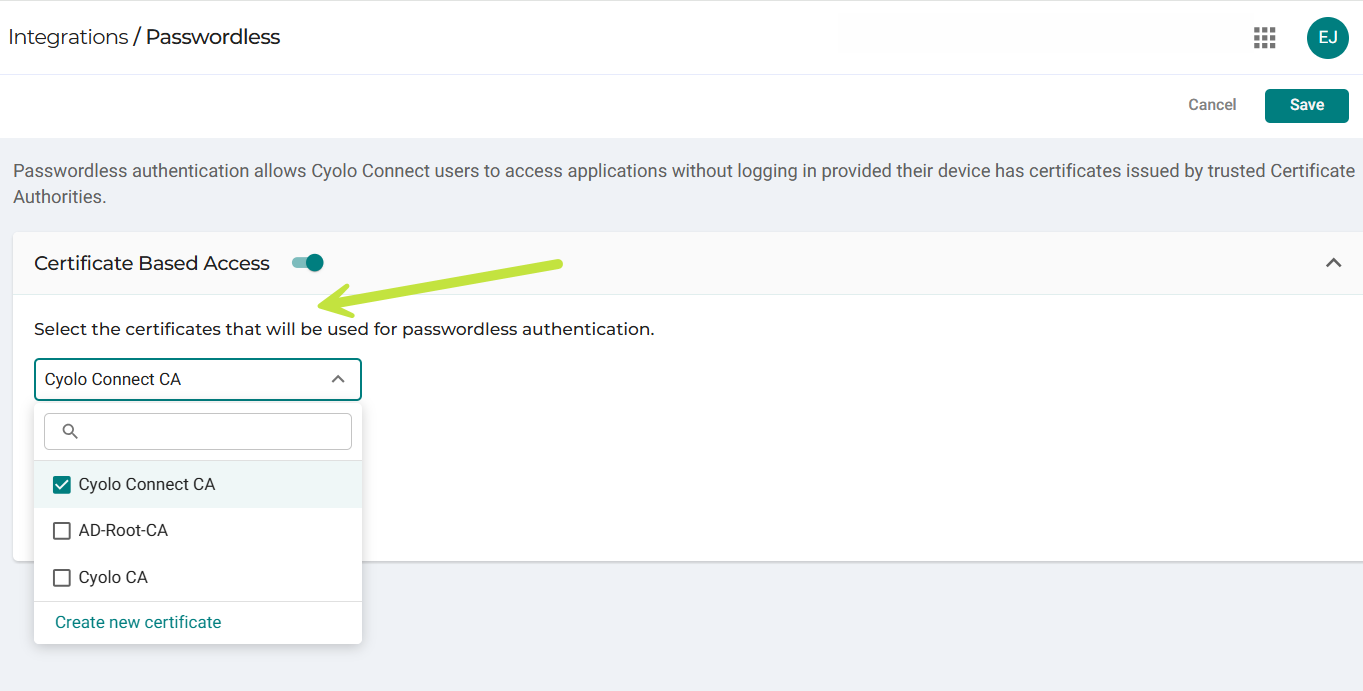
- Choose how Passwordless Authentication interacts with MFA requirements by selecting or not selecting Treat Users as Having Completed MFA.
- Click Save.
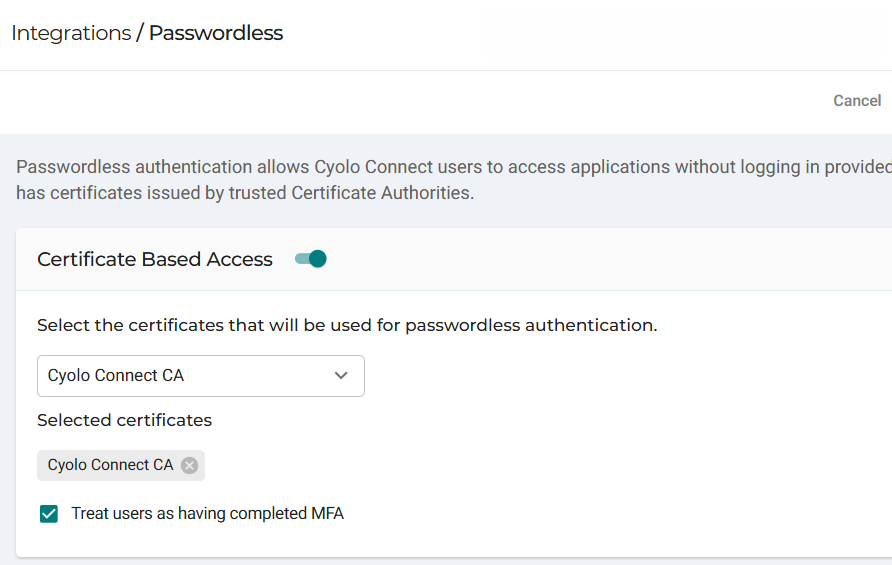
Treat Users as Having Completed MFA
If this option is enabled, users authenticated via Passwordless Authentication can access applications that require MFA without additional authentication steps.
If this option is not enabled, users inherit MFA settings from their IdP configuration and may be required to perform MFA when accessing applications that enforce it, depending on the MFA provider configuration.
The appropriate MFA handling depends on your security policies. If your organization considers certificates a strong authentication factor, enable Treat Users as Having Completed MFA to provide seamless access.
Enable Passwordless Authentication for an Application
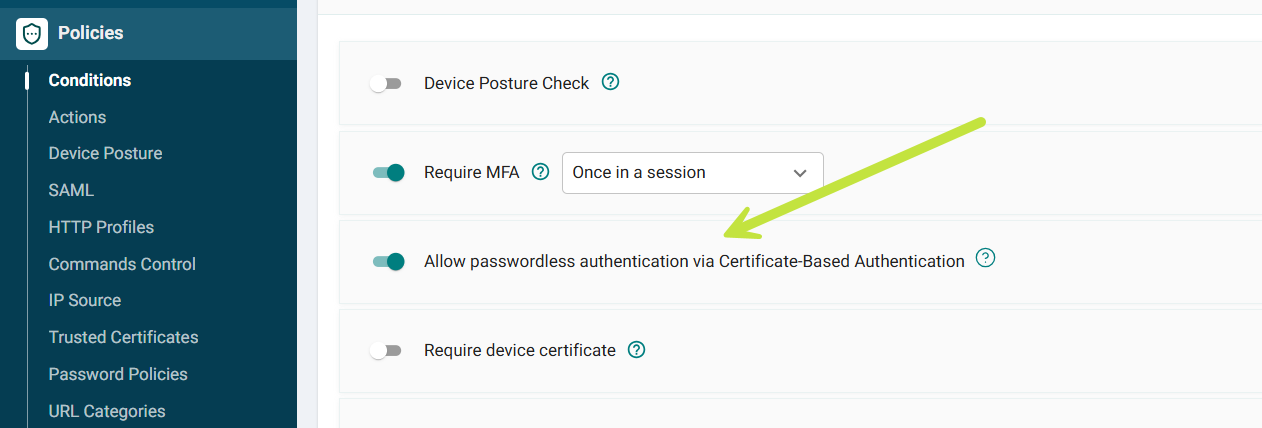
Passwordless Authentication can be enabled, on a per-application basis, through condition policies:
- Navigate to Applications and select the application you want to configure.
- Go to the Rules or Policies section.
- Edit or create a condition policy.
- Select Allow seamless certificate-based authentication in the condition policy settings.
User Experience
Cyolo Connect Certificate
-
The first time a user accesses an application enabled for Passwordless Authentication, they must log in.
-
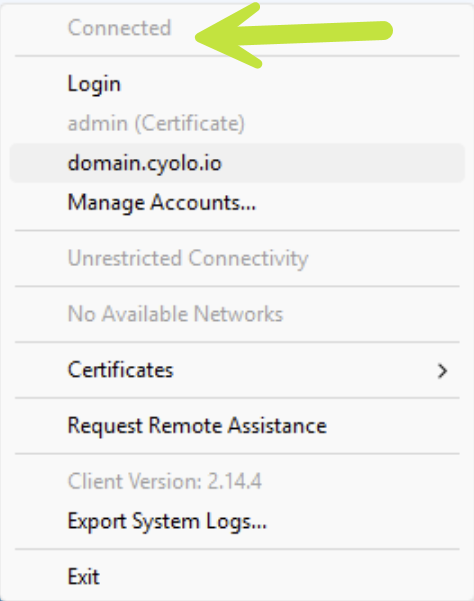
After the initial login, the user connects automatically and no further login is required, even after a reboot.
Users who are connected see a Cyolo Connect status of Connected. Note: the login option remains available for accessing applications that are not enabled for Passwordless Authentication.
Your Organization's Certificate
- No login is required, even on first access.
- Users can access applications enabled for Passwordless Authentication as long as the certificate remains valid.
Updated 7 months ago