
Web Application Firewall (WAF)
Application Access Control Logic
In Cyolo, the Web Application Firewall (WAF) behavior is driven by application-specific rules. Each application can have multiple rules, and each rule consists of three main components: Identities, a Condition Profile, and an Action Profile.
The system evaluates the rules sequentially when a user attempts to access the application. It checks whether the requesting identity matches each rule and whether all defined conditions are satisfied. If both the identity and the conditions match, the rule is selected, and access is granted.
Once a matching rule that grants access is found, the system stops evaluating any further rules. If no rule matches, access is denied.
This same logic applies to HTTP/web applications. After a rule is selected and access is granted, the WAF behavior is determined by the Action Profile associated with that rule, which defines how requests are handled for the entire session. The selected Action Profile and its assigned HTTP Profiles remain in effect until the session ends.
WAF Enforcement via Action Profiles and HTTP Rules
An Action Profile can include multiple HTTP Profiles. Each HTTP Profile may contain several rules, and each rule may include multiple conditions. The evaluation logic is as follows:
- OR between HTTP Profiles
- OR between rules within an HTTP Profile
- AND between conditions within a rule
For example, an HTTP Profile may include:
- Rule 1: METHOD = DELETE
- Rule 2: METHOD = PUT AND URI ≠ login
- Rule 3: METHOD = POST AND URI ≠ login
This results in the following logic:
BLOCK if (METHOD = DELETE) OR (METHOD = PUT AND URI ≠ login) OR (METHOD = POST AND URI ≠ login)
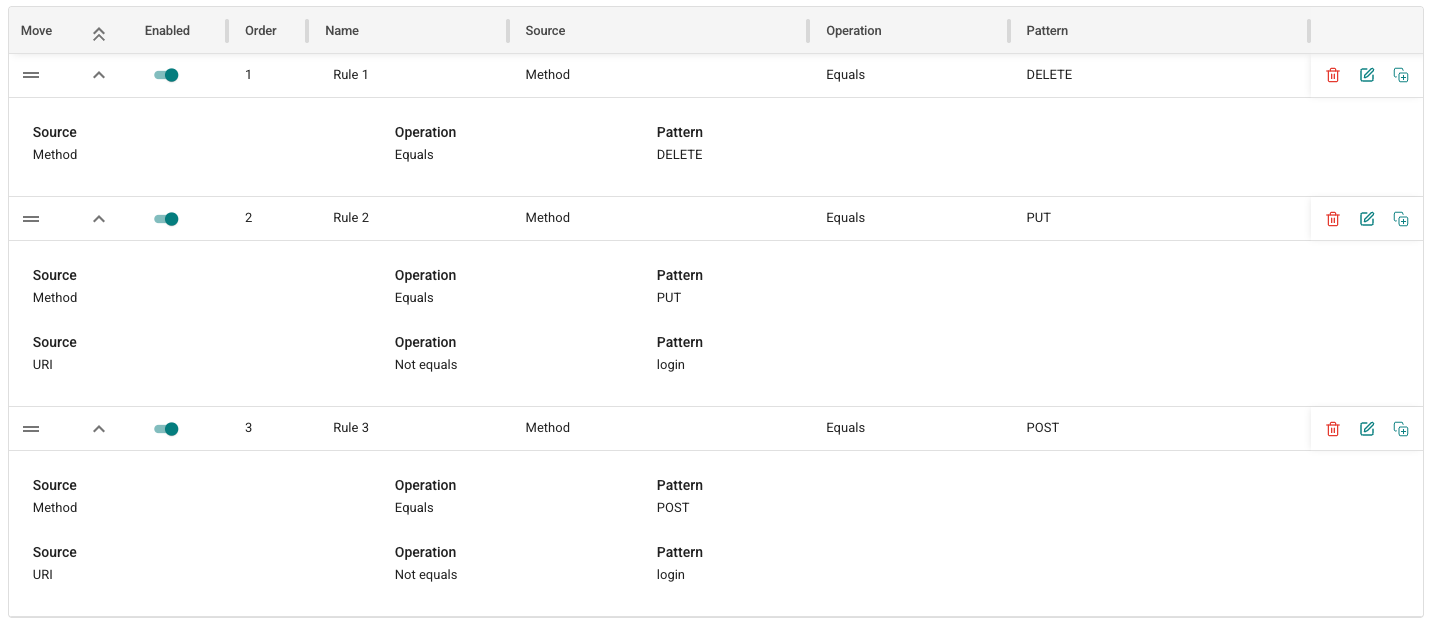
HTTP Profile Example
Within the Action Profile, when selecting HTTP Profiles, the admin can define the enforcement mode:
- Block – blocks requests that match the HTTP Profile rules
- Report – logs requests that match the HTTP Profile rules without blocking them
Updated 5 months ago